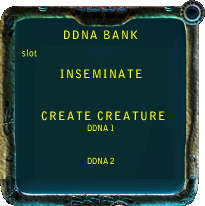
Description
This nifty tool will store up to 10 genetic codes (DDNA) in it's memory slots. You can then use these codes to create a new creature using 2 DDNA slots or impregnate a female with one of the slots
| Fact | Value |
|---|---|
| Original File | c3ddnabank.zip |
| Game |
|
| Creator |
|
| Wiki Link | Search "DDNA Bank" on creatures.wiki |
| Tags |
Archive has been repacked for EemFoo. Click to here
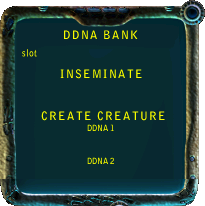
This nifty tool will store up to 10 genetic codes (DDNA) in it's memory slots. You can then use these codes to create a new creature using 2 DDNA slots or impregnate a female with one of the slots
::----- DDNA ReadMe.txt -----::
DDNA Bank

Updated: 01-24-00

Author:
JayD
*****@fcmail.com
http://www.fortunecity.com/millennium/greendale/1074/default.htm

INSTALLATION
Simplicity itself! Just place the DDNABank.agent file into your
Creatures\My Agents\   folder. The new agent (including sounds and images)
is available for injection with your Creator machine in your world
(new or existing). Look for "DDNA Bank" in the Creator screen.

FEATURES
This nifty tool will store up to 10 genetic codes (DDNA) in it's memory slots.
You can then use these codes to create a new creature using 2 DDNA slots or
impregnate a female with one of the slots. This is specialy useful for selective
breeding programs.

STORING DDNA INFO
Cycle through the available slots with the arrow buttons. To store a genetic code
just select a creature and then press the target button on the right side. The
DDNA will be stored in the chosen slot and the name of the targeted creature will
be displayed. Any previous DDNA info in the slot used will be over-written.

TO INSEMINATE A FEMALE
Cycle through the DDNA Bank samples until to have a sample that will be the father
for the new creature, NOTE: a female can be used as the father sample, since the
machine will take the DDNA of the female sample and create sperm with it. Then target
a living female in the game. Press the button on the right of the INSEMINATE section
and the name of the selected creaure will be displayed on this section's screen.
Press the blue Inseminate Button on the left and the female will be impregnated.
NOTE: only females that are YOUTH and older will be able to get pregnant this way.
Also, the sex of the child is determined by the season of the time it was concieved.

FORCED EGG LAYING
Click on the INSEMINATE title and it will switch to LAY EGG. Use the above directions
for choosing a target to select a pregnant female. Then press the pink LAY EGG Button.
 <...truncated>

::----- DDNA ReadMe DE.txt -----::
DDNA Bank

Author: JayD
*****@fcmail.com
http://www.fortunecity.com/millennium/greendale/1074/default.htm

updated 01-24-00

ins Deutsche übersetzt von Mummy - *****@gmx.net

HINWEIS
Ich möchte hiermit auf die Seite "JayD's Creatures Workshop" (Adresse siehe oben) verwei-
sen, da der Autor seine Agenten immer wieder aktualisiert. Um sicher zu gehen, dass den
Creatures-Spielern immer die neuesten Updates zugänglich sind, hat er deshalb ausdrücklich
untersagt, dass seine Agenten auf anderen (deutschen) Seiten zum Download angeboten werden
dürfen.

INSTALLATION
Kopiere die "DDNABank.agent"-Datei in das Verzeichnis "Creatures 3\Meine Agenten\". Der
neue Agent (einschließlich Geräusche und Bilder) kann nun mit dem Erzeuger in deine Welt
(eine neue oder bereits bestehende) eingefügt werden. Wähle dazu "DDNA Bank" auf dem
Bildschirm des Erzeugers aus.

MERKMALE
Dieses hübsche Tool kann bis zu 10 genetische Codes (DDNA) anzeigen. Man kann diese Codes
zum Erzeugen neuer Lebenwesen verwenden, indem man zwei DDNA-Slots wählt oder ein Weibchen
mit einem dieser Slots befruchtet. Das ist besonders nützlich bei speziellen Zuchtvorhaben.

VORHANDENE DDNA INFO
Mit den Pfeiltasten gelangt man durch die verfügbaren Slots. Um einen genetischen Code
einzufügen, muss man ein Wesen auswählen und dann den Knopf auf der rechten Seite drücken.
Die DDNA ist nun im gewählten Slot verfügbar, und der Name des entsprechenden Wesens wird
angezeigt. Die vorherige DDNA-Information in diesem Slot wird überschrieben.

BEFRUCHTUNG EINES WEIBCHENS
Durchsuche die DDNA Bank nach einem geeigneten Vater des neuen Wesens. ANMERKUNG: Auch ein
Weibchen kann als Vater gewählt werden, da die Maschine die weibliche DDNA in Sperma um-
wandelt. Wähle dann ein lebendes Weibchen im Spiel aus und drücke den Knopf auf der rechten
Seite des Bereiches "INSEMINATE". Der Name des ausgesuchten Wesens wird angezeigt. Drücke
das blaue Eiersymbol links, und das Weibchen wird befruchtet. ANMERKUNG: Es können nur
 <...truncated>